Why I started this myself, and three examples of what you can build with Claude and Waterbloom.
We advertise through Google. That means four places to keep track of: the campaigns in Google Ads, Analytics, Merchant Center and Search Console. For years I had external agencies handle that.
Every time I ended up dissatisfied. A fee every month, and a login to a portal I couldn’t make sense of: so much information that I couldn’t see the wood for the trees. The invoice came every month, the results stayed behind.
I wanted to understand it myself, and to be rid of agencies that cost me money every month. That was the basis of my first cockpit: one screen with only the things I understand and really want to see. If I have a substantive question, I just ask it and get a direct answer based on my own data. Without an extra invoice.
My cockpit today looks different and is a lot more extensive. Every addition is something I ran into along the way and that I understand one hundred percent. It was, and still is, a learning journey: very visual, very tangible, and without an external agency.
If I can do it, so can you.
Advertising · Google Ads
€ 7.18
revenue per euro spent. This week € 412 spent, € 2,960 in sales.
Going wellVisitors · Analytics
1,840
visitors this week. That is 6% more than last week.
Going wellProducts · Merchant Center
3
products disapproved. All three are missing a shipping price.
Needs actionFindability · Search Console
Position 8
on average in Google. A month ago it was position 11.
Going wellWhy did the Bags campaign bring in less this week?
The cost per click rose by 22%, while just as many people bought. A competitor has been bidding higher on the same keywords since Monday. Shall I shift the budget to the two best-performing campaigns?
Illustration with made-up figures. My first cockpit started this simply.
Not a portal with a hundred figures, but the few things I steer by, in plain language.
Why did this campaign drop? I ask the question and get an answer from my own data, not from a monthly report.
I pay for Claude and for the place where it runs. Not for someone to keep track of it for me.
"We advertise through Google and I lose the overview between Google Ads, Analytics, Merchant Center and Search Console. Build one dashboard with only the figures I need to make decisions, explain them in plain language and let me ask questions about them."
Read the whole story, and how to start yourself →
The image above is an illustration with made-up figures, because my real cockpit contains business data.
The examples below are working demos we built ourselves, with the prompt you read alongside them. They are not existing customers. The story above is real: it is mine.
Three examples to try yourself
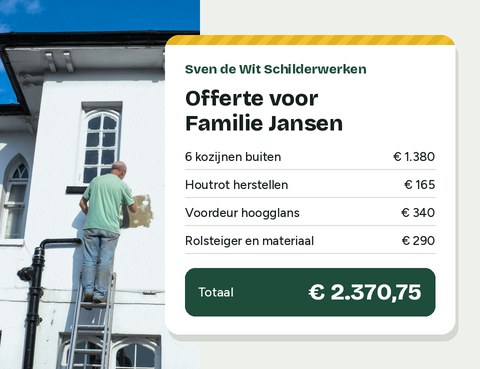
Sven was up a ladder all day and typing quotes all evening. He wanted to give a price while still at the customer’s, using his own rates, without calculating anything at home.
"I’m a house painter. Make a calculator for my phone that lets me create a quote at the customer’s. I charge €230 per exterior window frame, €145 per interior door, €14 per m² of wall and €16 per m² of ceiling. Front door €340, wood rot €165 per spot, scaffolding €290. If the old paintwork is fair or poor, add 10 or 25 percent."
His own quote tool: tap in what you see on site and the quote updates instantly, including VAT and an estimate of working days.
This is a demo environment, built for this page — not an existing person, and the prices are made up.

Iris explained the same things in her treatment room every week. She wanted a home for that knowledge, with the latest news from her field alongside it, without spending time on it every week.
"I’m a sports physiotherapist and want a home for my knowledge about running injuries. Make a site with who I am, the three topics I get asked about most, and a news page. Every Monday morning, find last week’s news about running injuries, summarise it briefly and add the source."
A personal site with her story, three expandable knowledge topics and a news block that is refreshed every week.
This is a demo environment, built for this page — not an existing person. In the demo the news items are examples.

Thijs bakes sourdough bread every Saturday. His recipes and notes were spread over three note apps, a notebook and his head. He wanted one place to find them again and show them to others.
"I bake sourdough bread as a hobby. Make a site from my recipes and notes, with a search box, and a calculator that works out how much flour, water, starter and salt I need to weigh. I’ll paste my notes below."
His breads with photo and key figures, a search box, a dough calculator with sliders and a baking log of what went right and wrong.
This is a demo environment, built for this page — not an existing person.
Sound familiar? This is how you get started too.
Choose your package